
An Android phone already has what a home inspection needs: a good camera, a screen you can read on site, voice input and room for hundreds of photos. Whether the report gets finished before you leave depends on the home inspection software you run on it. Here are six things to look for when you compare home inspection software for Android, so the phone in your pocket can do the whole job.
The whole report, written on your phone
Some inspection software treats the phone as a camera for the office computer. You collect photos and notes on site, and the report gets written later at a desk. That splits the job in two, and the second half is the one that takes your evening.
When you compare home inspection software for Android, start with this: can the app write the complete report? You should be able to add every observation with its comment and photo, fill in each section, review the report and send it to your client, all from the phone.
The easiest way to find out is a trial run. Inspect your own house with nothing but the phone. If you reach the end and still need a computer to finish, the phone is only half of the software.
A computer is still handy for polishing a long report, so it helps when the same report also opens on a desk. That should be your choice, though, not a step the software requires.
Photos go into the report as you take them
A home inspection produces a lot of photos. Taken with the phone’s camera app, they land in your gallery as one long roll, and each one has to be matched to its observation later. That matching is slow desk work, and it’s where a photo ends up beside the wrong observation or gets left out of the report altogether.
Look for software with its own camera, where each photo is taken for an observation and goes into the report with it. Then check the other direction too: you should be able to import photos from the gallery, for the ones that reach your phone from another device, such as a thermal camera or a drone.
Check video as well. A short clip shows what a photo can’t, like a breaker that trips or a sink that drains slowly, and it should go into the report the same way a photo does.
Speak your observations instead of typing them
Typing on a phone is slow, and on site, with gloves on or a flashlight in your hand, it’s slower still. Android phones have speech recognition built in, so describing an issue takes a few seconds instead.
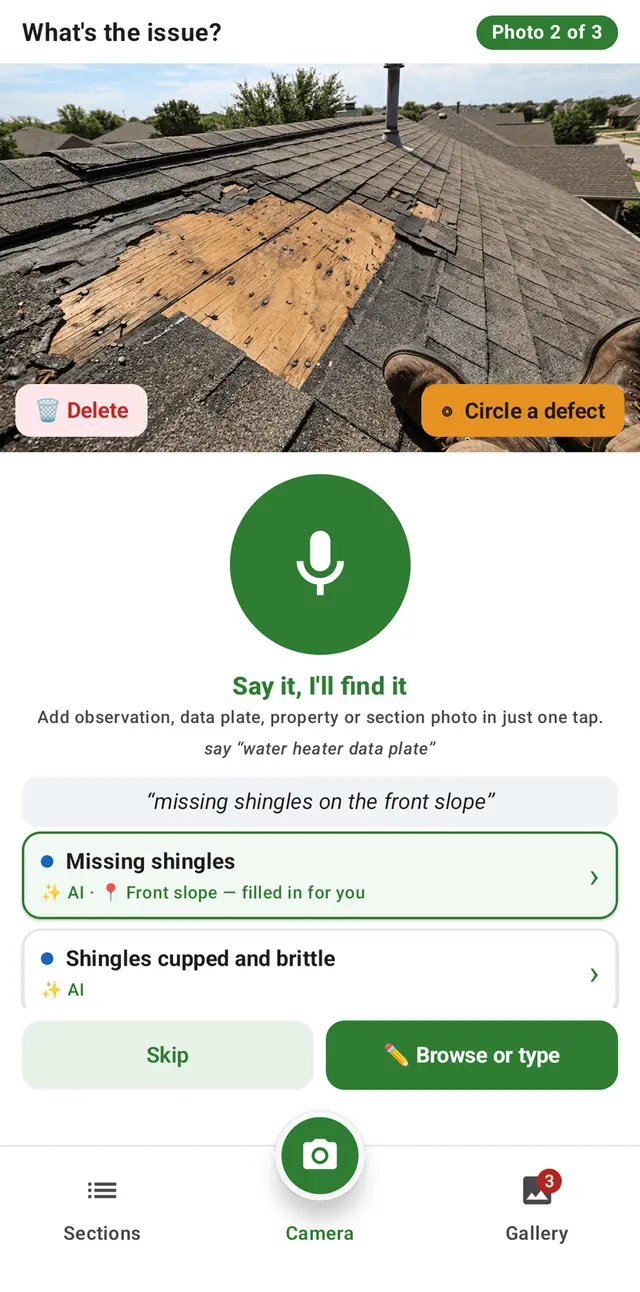
Good home inspection software uses your voice to find the comment you already wrote, not to dictate the report. You describe what you see in plain words, and the software matches it to the right comment in your library, so the report reads in your wording, not as a transcript.
One setting is worth checking. Some phones only recognize speech without a signal after the offline speech files have been downloaded. Do it once at home on Wi-Fi, and voice input is ready for the next crawlspace.
Benefits of home inspection software with voice input
It works where the signal doesn’t
Crawlspaces, basements and rural properties far from a tower are exactly where the signal drops. Software that needs a connection to save an observation or search your comments stops working there, and every observation you can’t record on the spot is one you have to remember for later.
Look for software that works fully offline: observations, photos and comment search all on the phone, with everything saved and backed up once you’re back in range. Then test it before you rely on it. Put the phone in airplane mode, walk through a few rooms and write up what you find.
Offline home inspection software that works without internet
Your reports are backed up without you thinking about it
Phones get dropped from ladders, left on roofs and soaked in crawlspaces. If your reports live only on the phone, one accident can take a week of reports with it, along with the photos that back up what you wrote.
That matters long after the inspection. Your report and its photos are your record of the house on the day you saw it, and that record is what you’ll reach for if a client questions an inspection after closing.
So look for software that backs up every report, photo and video automatically as you work, to an account you control, and that can put a report back onto a new phone. Ask, too, whether you keep your reports if you ever stop using the software.
Pick a phone that holds up on site
One advantage of Android is choice: there are phones at every price, including rugged models built for job sites. Home inspection software for Android is only as useful as the phone it runs on, so a few things are worth weighing when you choose one.
- Water and dust protection. A rating of IP67 or IP68 means the phone is sealed against dust and can survive being dropped in water.
- A bright screen. You’ll read it on roofs and driveways in full sun.
- Storage. Photos and video add up quickly, so choose more than you think you need.
- Battery. It should last a full day of inspections. Keep a charging cable and a battery pack in the truck anyway.
- A case with a grip or a strap. A phone that slips off a roof is a phone you’re replacing.
A phone that dies by mid-afternoon, or can’t be read in the sun, sends the report back to the desk no matter how good the software is.
How JetInspect works on Android
I built JetInspect on Android first, after years of making Android apps that inspectors use for wind mitigation, 4-point and wood-destroying insect reports.
The whole report is written on the phone. Take a photo, or a clip of up to 60 seconds, with Capture and Insert, describe the issue, and one tap inserts your comment and the photo into the right section of the report. The comment search runs on your phone, so it keeps working with no signal.
Reports, photos and clips are saved to your own Google Drive as you work, and you can restore a report onto a new phone from Drive. When the report is done, publish it from the phone and send it to your client by email, or text them the link. If you’d rather finish at a desk, the same report opens in the web editor on any computer.
JetInspect runs on Android 10 and newer. It comes with more than 1,500 comments, or you can import your own, word for word, from Spectora, HomeGauge or a spreadsheet.