
Every inspector has stood on a driveway with a clipboard because the client never opened the email with the PDF. The buyer is excited, the agent is checking the time, and you are asking someone to read four pages of legal text on a porch before you can start work.
Most of the time they sign and nothing comes of it. The trouble is the one time they don’t, or the one time you skipped it because it felt awkward. If you are choosing home inspection software with agreement e-signature, it is worth seeing what paper costs you in a normal year, what a missing signature costs in a bad one, and what the software should do about both.
What a paper agreement costs in a normal year
Print it, bring it, get it signed at the door, scan it at home and file it with the report. Call that five minutes an inspection when everything goes well.
Hours a year spent on paper agreements, at five minutes each
At 250 inspections that is half a work week a year spent on a signature. And those are the good days. The bad ones are the mornings you start late because the client is reading on the porch, or the evenings you email a PDF back and forth with someone who has no printer.
What a missing one costs
The minutes are not the real cost. The real cost is the inspection that begins without a signature, because the client was running late and stopping everything felt worse than starting. Your agreement is where the scope of the inspection and its limits are written down. If a complaint ever arrives, it is the first document anyone will ask you for, and “they were going to sign it” is not an answer.
Some states spell out the timing. New Jersey’s rule says the inspector must send the agreement “no later than one business day after the appointment for the home inspection is made,” and that it “shall be executed prior to the start of the home inspection.” Florida requires a written disclosure of “the scope and any exclusions of the home inspection” before contracting for or commencing one. Whatever your state says, the idea is the same: in the client’s hands early, and signed before you start.
Paper works against both halves of that. An electronic signature solves both, and it is a real signature. Federal law says a signature or contract “may not be denied legal effect, validity, or enforceability solely because it is in electronic form.”
What to look for in home inspection software
Send the agreement with the appointment
The agreement should not be a separate email you remember to send. It should be part of the appointment, so the client can read and sign as soon as the inspection is scheduled, days before you arrive. That is how “one business day” stops being something you track and becomes something that just happens.
The order that protects you
- 1Inspection scheduledThe agreement goes to the client
- 2Client signsOn their phone, in about a minute
- 3You inspectThe signature is already in
- 4Report deliveredOpens for a client who has signed
Make signing take a minute
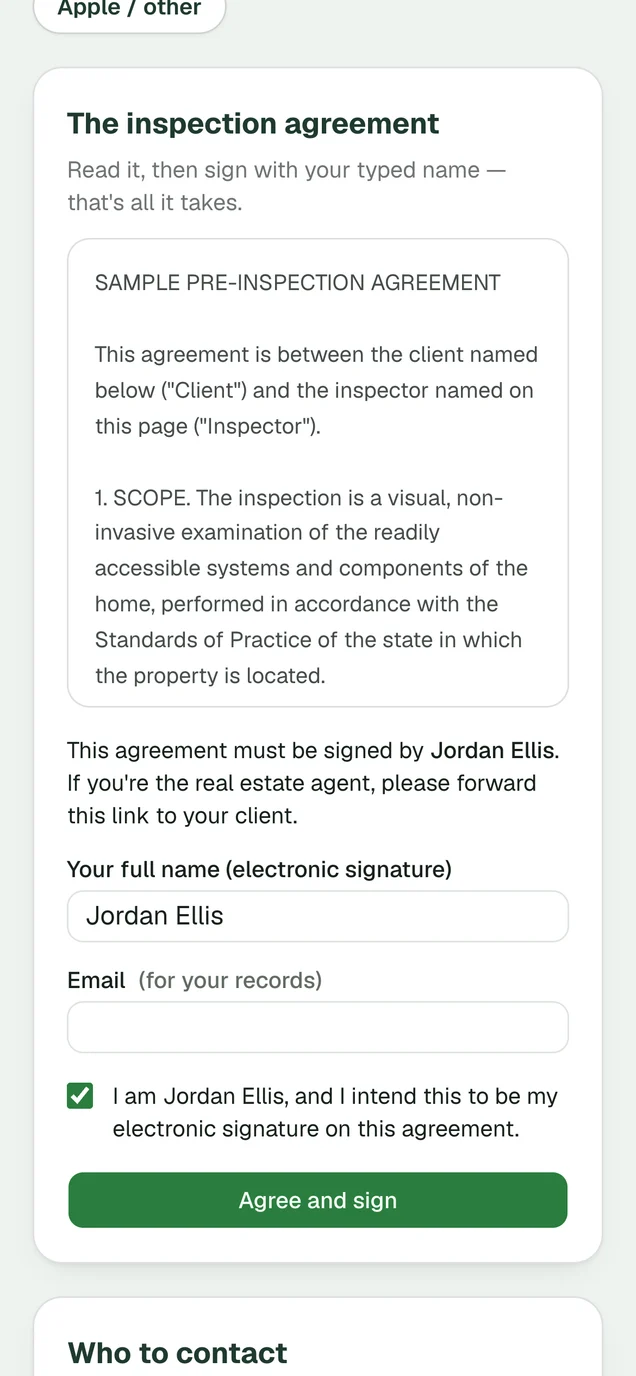
Every step you add loses clients. Print, sign and scan loses most of them. So does “create an account to sign,” and so does a security code sent to a phone they can’t find. The client should open one link, read the agreement, type their name and be done, on whatever device they are holding. When you compare software, sign a test agreement yourself on your phone and count the steps.
Use your agreement, not a template
Your insurer or your attorney had a hand in your agreement, and your state may have rules about what it contains. A generic agreement supplied by a software company knows none of that. The software should take your text and present it word for word.
Keep a record of exactly what was signed
Here is the situation to plan for. A complaint arrives two years after the inspection, and you have revised your agreement twice since. The question is not whether the client signed something. It is what they signed, and when. Good software records who signed, the date and time, and the exact text they agreed to, and it leaves that record alone when you edit your agreement later. It should also give you a signed copy as a PDF, kept somewhere you own, because inspectors change software and the records have to outlast the subscription.
Hold the report until it is signed, and let you decide otherwise
A delivered report with an unsigned agreement is the worst position to be in, because the client has no reason left to sign. Software that can hold the report until the signature is in removes that decision from your evening. You still need the last word, though. Some clients sign on paper at the door, and a repeat investor has signed your agreement a dozen times. You should be able to record a signature taken another way, or switch the requirement off for one report.
Get every agreement signed before you arrive, with JetInspect
In JetInspect you paste in your own inspection agreement once, on the web. JetInspect supplies no agreement text of its own and does not change a word of yours. The agreement is fully integrated with the appointment, and clients can sign in advance or before they view the report. To sign, the client opens their link, types their full name as their electronic signature, ticks one box and taps Agree and sign. There is no account and no code.
JetInspect keeps who signed, when, and the exact text they agreed to, and editing your agreement does not modify signed agreements. The signed agreement is saved as a PDF to your own Google Drive, with the report. With Require agreement on, the report and its PDF stay closed until the agreement is signed. On any report you can turn that off, record that the client signed another way, or ask for a new signature.
Try JetInspect risk free for 30 days. Paste in your agreement, schedule a test inspection for yourself, and sign it on your phone the way a client would, before you pay anything.