
Most of an inspector’s week isn’t spent inspecting. It’s spent answering the phone, quoting, finding a time, chasing a signed agreement, reminding people, and driving. Good home inspection software with scheduling takes that work off your plate. This guide goes through the scheduling features worth having, one at a time, and the problem each one solves, so you know what to look for before you pay.
1. Clients can schedule from your website
Clients and agents don’t only call during business hours. They look at your website at 9 p.m. after a showing, or on a Sunday when the offer is accepted. If the only way to get on your calendar is to call you, some of them will call the next inspector on the list instead.
A scheduling form on your own website turns those visits into appointments while you’re on a roof or at dinner. Look for one you can add with a simple copy and paste, so you don’t need a web developer, and that tells you on your phone the moment someone schedules. Every inspection booked online is a phone call you didn’t have to take.
2. Your services and your prices, set once
Every inspector sells a slightly different menu: the standard home inspection, radon, a sewer scope, a pre-listing, a 4-point. If your software can’t hold your real services and prices, you end up doing math on a notepad and typing totals by hand, and that is where mistakes and undercharging creep in.
Look for software where you can add and remove services and set your own pricing, so every quote and every online booking comes out the same way. Just as important: you should still be able to adjust a price while giving a quote, for the job that’s farther out or the repeat agent you give a break to. Your price list should be a starting point, not a cage.
3. Quote and schedule from your phone, while you’re still on the call
The call usually comes when you’re not at a desk. You’re in a crawlspace, in the truck, or standing in someone’s driveway. “Let me get back to you with a price” is how jobs slip away, because the buyer is calling three inspectors and the first one with a number and a time often gets it.
Software that lets you quote a job and put it on the schedule from your phone, during the same call, closes the deal before you hang up. Check that the phone app can do both the quote and the appointment, not just show you what’s already booked.
4. Availability, time off and travel buffers
Online scheduling is only helpful if it offers times you can actually make. A form that shows open slots back to back, with no room to drive across the county, creates a day you can’t keep. One that doesn’t know you’re on vacation creates an awkward phone call.
Look for software where you set your available hours, block off time off, and add travel time between appointments. Then the times your clients see are times that work for you, and you stop playing defense with your own calendar.
5. The inspection agreement built into the appointment
An unsigned agreement is a risk, and chasing a signature on inspection day is a hassle nobody needs. When the agreement lives in a separate system, it’s easy for one to fall through the cracks.
Look for software where the agreement is part of the appointment itself, so the client gets it as soon as the inspection is scheduled. Even better is the option to hold the report until the agreement is signed, and to control releasing the report until you’ve been paid. That puts the leverage back where it belongs, without awkward conversations.
6. Confirmations, reminders and change notices sent automatically
A client who schedules and hears nothing wonders whether it worked, and calls you. A client who forgets about tomorrow’s inspection leaves you standing at a locked door. And every time you move an appointment, someone has to tell the client and the agent.
Look for software that sends a confirmation when the inspection is scheduled, a reminder the day before, and notices when an appointment is changed or canceled, all automatically and with your branding. Fewer no-shows, fewer “just checking” calls, and a business that looks organized every time a client opens their email.
7. Today’s schedule on your phone: tap to navigate, tap to call
Home inspectors are busy, and inspection days move fast. You finish one house, climb into the truck, and need the next address now. Digging through emails for the address, then copying it into a maps app, then searching for the client’s number to say you’re running ten minutes late, adds stress to a day that already has plenty.
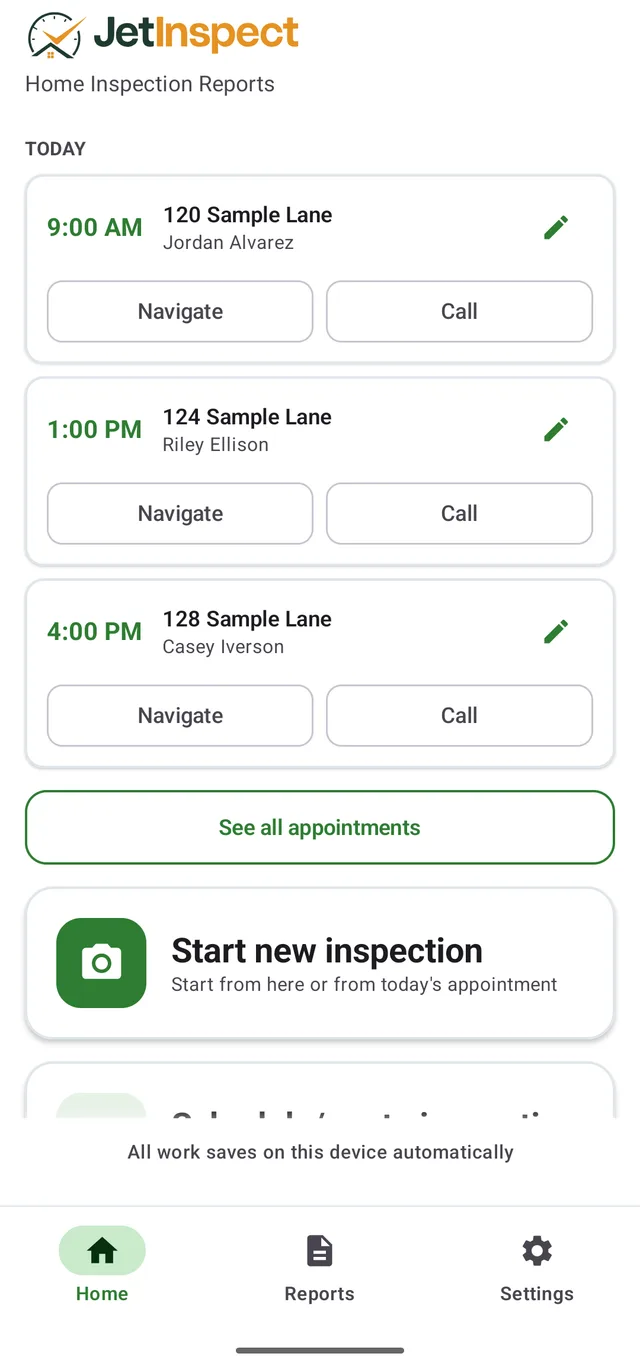
Look for software that shows your day’s appointments on your phone, where one tap starts navigation to the house and another calls the client. You just get up and go. It’s a small thing that you’ll use several times every single day.
8. Add the real estate agent in a few keystrokes
Agents are the source of much of your work, and nearly every inspection involves one. Typing an agent’s name, email and phone from scratch on every booking is slow and invites typos, and a typo in an email address means the agent never gets the confirmation.
Look for software that lets you import your realtor list and pick an agent with a few keystrokes while scheduling. The agent gets the right details, you save time on every booking, and your referral sources see you keeping them in the loop.
9. Specialty reports ready when the inspection is scheduled
If you do 4-point or wind mitigation inspections, you know how much of each form is information you already collected when the job was booked: the client, the address, the date. Typing it all a second time is wasted effort.
Look for software where scheduling a 4-point or wind mitigation inspection prefills those forms for you. The scheduling system and the report should be one system, not two that you copy between.
10. For multi-inspector firms: a schedule that has automation
Once you have more than one inspector, scheduling stops being about one calendar and becomes about keeping a team busy and fair. Done by hand, the owner or office manager spends hours deciding who goes where, and mistakes are expensive: an inspector double-booked, another sitting idle, a job nobody was assigned to.
Here is what a growing firm should look for:
Automatic job balancing.Each new inspection goes to an inspector who is free and has the fewest jobs that day. Work is spread evenly, nobody is overloaded, and the office doesn’t have to decide every assignment.
Appointment times firm-wide and per inspector. Set standard times for the firm, then adjust them for the inspector who starts early or only works mornings.
Time off per inspector. When someone takes time off, the office should be told if any inspections need to be rescheduled, rather than finding out when a client calls asking where the inspector is.
A manual override. Automatic is great until a client asks for a specific inspector or a job needs two people. You should be able to add or swap inspectors on any appointment.
Unassigned jobs that stand out. A job without an inspector is a missed appointment waiting to happen. Look for a dashboard that highlights unassigned inspections, so nothing slips through.
If you work alone today, it’s still worth asking whether your home inspection software with scheduling can grow with you, so hiring your first inspector doesn’t mean switching systems.
How JetInspect measures up
Here is the list above, answered for JetInspect as home inspection software with scheduling. The scheduling system is included, not an add-on.
Website scheduling.A copy-and-paste widget puts scheduling on your website, and you’re notified on your phone when a client schedules.
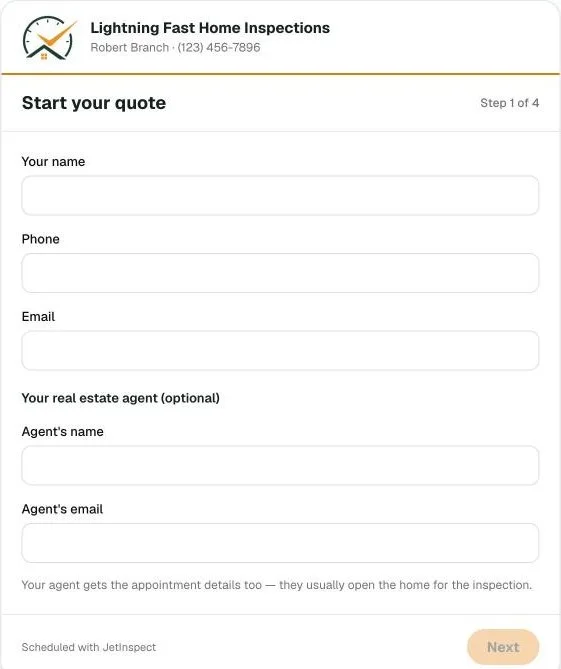
Services and prices. Add or remove services, set your pricing, and customize prices while giving a quote.
Phone quoting.Quote a job and schedule the inspection from your phone while you’re still on the call, in the field or at the office.
Availability. Set your availability, time off and travel buffers.
Agreement.The inspection agreement is integrated with the appointment, reports can be blocked until it’s signed, and you control releasing reports until you’re paid.
Client emails. Branded confirmations when an inspection is scheduled, reminders the day before, and automatic change and cancellation notices.
Daily schedule. Your appointments on your phone, with one touch to navigate or call your client.
Agents. Import your realtor list and add an agent in a few keystrokes while scheduling.
4-point and wind mitigation. Client and property information is automatically populated when the inspection is scheduled.
Firms. Jobs are balanced automatically to whoever is free with the fewest that day; appointment times are set firm-wide and per inspector; per-inspector time off notifies the office if inspections need rescheduling; you can add or swap inspectors on any appointment; and unassigned jobs are highlighted on the dashboard.
Try it free for 30 days. Set up your own services and prices, schedule a few real inspections, and see how it fits your day before you pay anything.