
Most of a home inspection happens away from a keyboard: in the attic, under the house, at the electrical panel. Home inspection software with voice input lets you record each observation as you find it, instead of piecing it together that evening. Here are six ways it helps a home inspector, and what to look for in software so it works when you need it.
Speaking an observation is faster than typing it
Typing on a phone is slow, and on site it’s slower still. Your hands are dirty, you’re wearing gloves in the crawlspace, or you’re holding a flashlight in the attic. Typing out a full observation at those moments means stopping and setting things down, so the note gets put off. That’s how observations end up waiting until you’re back at the office.
Speaking takes a fraction of the time. Tap the microphone, describe what you see the way you’d explain it to the buyer, and you’re done in a few seconds. Your attention stays on the house instead of a keyboard.
Observations that don’t need a photo work the same way. Noting a missing GFCI or a water heater near the end of its life takes a few seconds to say, and you keep walking.
Record observations right away
A home inspection turns up dozens of observations, and each one has to be remembered until it’s written down. When the writing waits until you’re back at the office, details fade: which slope the shingles were missing from, whether the stain under the sink was wet or dry, the outlet you meant to come back to. With every hour that passes, the chance of leaving something out grows, and so does your liability. The issue that never makes it into the report is the one the buyer finds after closing.
Voice input lets you record each observation while you’re still looking at it. You describe what you see in a few seconds, without putting down your flashlight, and it’s recorded before you move on.
Recording on the spot is a habit, though, and after years of writing reports in the office later, the old routine can be hard to break. So start small. Choose an inspection where you expect fewer issues, such as a condo, a small home or new construction, and record every observation as you find it.
Once you start, stick with it. As you do, you’ll learn and adjust the way you work through a house. Let the confidence that comes from recording each issue on the spot keep you on track. Before you know it, you’ll have trimmed two to three hours of work from your day.
Your report should read in your words, not a transcript
Most phones can turn speech into text, and it’s tempting to dictate observations straight into a report. But spoken words make a poor report. Say “missing shingles on the front slope” and that’s exactly what you get: one line, with no explanation of why it matters and no recommendation for the buyer. Dictation also brings its own mistakes, like “singles” for “shingles”, which you then have to catch later.
The comments in your library are different. You wrote them with care, they explain the issue and what to do about it, and they read the same way in every report. That consistency is part of what makes a report look professional. It also protects you, because the wording was thought through before it ever reached a client.
So the best use of voice input is to find the right comment, not to replace it. Describe the issue in plain words, and your home inspection software matches it to the comment you already trust, even if you don’t remember its title. You get the speed of speaking and the quality of your written library.
A narrated video shows what a photo can’t
Some defects only show up in motion: a breaker that trips, a fan that rattles, a sink that drains slowly, a garage door that doesn’t reverse. A photo can show the sink, but not how long it takes to drain. A short video can, and it shows the buyer the issue the way you saw it.
Narrating while you film adds what a video can’t show on its own. You say what’s happening and why it matters at the moment it happens, so you don’t have to work out later what a clip with no context was meant to show. The video also becomes a record of the condition on the day of the inspection, which matters if the issue is ever questioned after closing.
When your software listens to the narration, a video works like any other spoken observation. What you said finds the matching comment, and the clip goes into the report with it.
Voice input has to work where the signal doesn’t
The places where your hands are busiest are often the places with no signal: crawlspaces, basements, attics, and rural properties far from a tower. Voice input that depends on an internet connection fails exactly there, and an observation you can’t record on the spot is one you have to remember for later.
So check whether the voice input in your home inspection software works offline. Ideally, both the speech recognition and the comment search run on the phone itself, so they keep working with no signal at all.
It’s also worth a minute in your phone’s settings. Some phones only recognize speech without a signal after the offline speech files have been downloaded. Do it once at home on Wi-Fi, and your voice input is ready for the next crawlspace.
The report is done before you leave
Together, these benefits add up to one result. When every observation is recorded where you find it, in your own wording and with its photo or video, the home inspection report is largely written by the time you’ve walked the house. What’s left is a review, not a writing session.
That changes the end of your day. Instead of an evening at the desk turning notes into a report, you look it over, make any changes and deliver it before you leave the property.
It matters to your clients, too. The buyer and their agent often have only a few days under the inspection contingency to ask for repairs, and a report delivered the same day gives them every one of those days. Real estate agents notice. An inspector who delivers on the day of the inspection is one they know they can rely on, and that’s the inspector they refer to their next clients.
How JetInspect handles voice input
When I built JetInspect, I treated what you say as a search, not as the text of the report. The words in the report are the ones you already wrote and trust. Your voice only finds them.
Take a photo with Capture and Insert, and the screen asks “What’s the issue?” Tap the microphone and describe it. JetInspect lists the closest comments from your library, and one tap inserts the comment and the photo into the right section of the report. If you say where it is, such as “front slope”, the location is filled in for you.
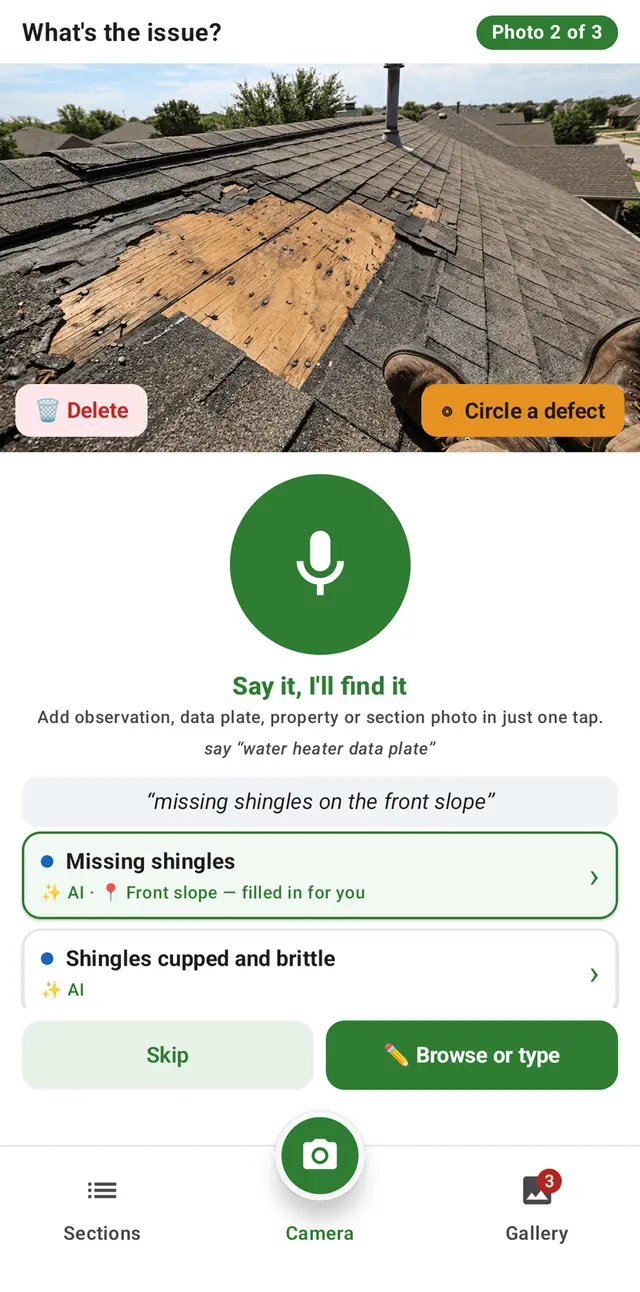
The same search works when you narrate a video clip of up to 60 seconds, and Rapid Voice/Text Entry adds an observation that doesn’t need a photo. The comment search runs on your phone, so it keeps working with no signal. When nothing fits, Save as my own observation adds your words to your library for next time.
JetInspect comes with more than 1,500 comments, or you can import your own, word for word, from Spectora, HomeGauge or a spreadsheet.