
You published the report at 4 p.m. By 7, the buyer’s agent has it open on a laptop at the kitchen table with a blank email beside it, copying your observations across one at a time. The seller has to have a repair request before the deadline in the contract, and your report is the raw material.
That evening is the hardest use anyone will make of your report, and it is the part most inspectors never see. If you are choosing home inspection software with a repair request builder, it helps to know what that evening is worth to you, what can go wrong in it, and what the software should do about both.
What an agent’s evening is worth to you
Start with the arithmetic. Say an agent sends you one buyer a month, and your fee is $450.
| Agents who send you one inspection a month | Inspections a year | Worth to you |
|---|---|---|
| 1 agent | 12 | $5,400 |
| 5 agents | 60 | $27,000 |
| 10 agents | 120 | $54,000 |
An agent does not decide who to recommend by the cover of a report. They decide by what the report is like to work with when the clock is running, and it always is. In Texas, for example, the Real Estate Commission tells buyers they “can use the option period to perform an inspection of the property and negotiate an amendment to the contract for any necessary repairs as a result of the inspection.” The option period is a number of days the buyer and seller agree on. The inspection, the report, the request and the seller’s answer all have to fit inside it.
Now picture the work. A request with twelve items, at two or three minutes each to find the line, copy it, paste it and tidy the formatting, is half an hour of retyping before the agent has added a single cost or written one sentence to the seller. An inspector whose reports save that half hour is easy to recommend again.
What goes wrong when your words are retyped
The time is the agent’s problem. The retyping is yours. A careful observation about a stain on a ceiling, with a recommendation to have a plumber evaluate it, turns into “leak, replace” by the time it reaches the seller. The seller and the listing agent read that as what the inspector said. If it turns out to be wrong, the call comes to you, about a sentence you never wrote.
Costs are the other trap. The first thing a home buyer asks is what a repair will cost, and it is not your question to answer. Texas’s Standards of Practice, for example, say an inspector is not required to “provide repair cost estimates.” A number from you gets treated as a quote. But the request is stronger with figures on it, so the agent will ask, and it is hard to keep saying no to the person who sends you work.
What to look for in home inspection software
Start from the report, and keep your wording
This is the heart of it. A repair request builder should open with every observation from your report already listed, so the agent’s job is choosing and nothing is retyped. And each item should appear exactly as you wrote it, with no way for anyone to edit it. That one rule protects you more than anything else on this page: what reaches the seller is what you wrote. When you compare software, open a sample report’s repair request and try to change an item’s text. You should not be able to.
Let the agent pick by type
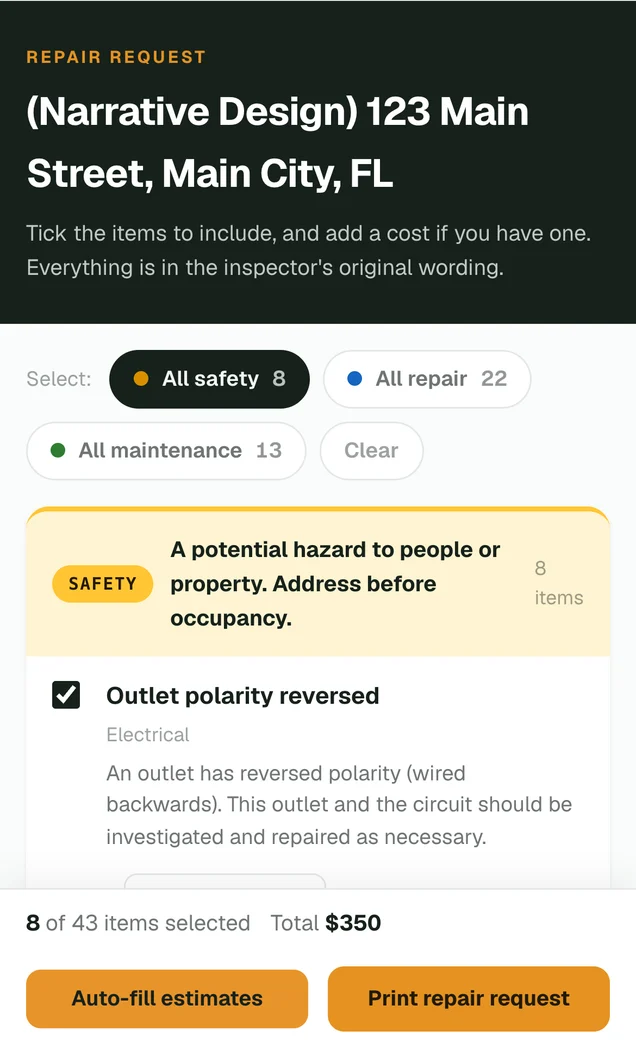
A repair request is rarely the whole report. The usual shape is every safety item, a handful of the repairs and none of the maintenance notes. If the list is grouped by the same levels your report uses, and a whole group can be selected in one tap, the agent builds that shape in seconds.
Put costs on the request without making them yours
The agent should be able to type a contractor’s figure beside any item. Better still is a way to fill in an estimated price range for each item, so a buyer who has no idea what a handrail costs has a starting number. What matters to you is the wording around those figures: the request itself should say they are estimates, not quotes, and that the inspector neither provided nor reviewed them.
Print it on your letterhead
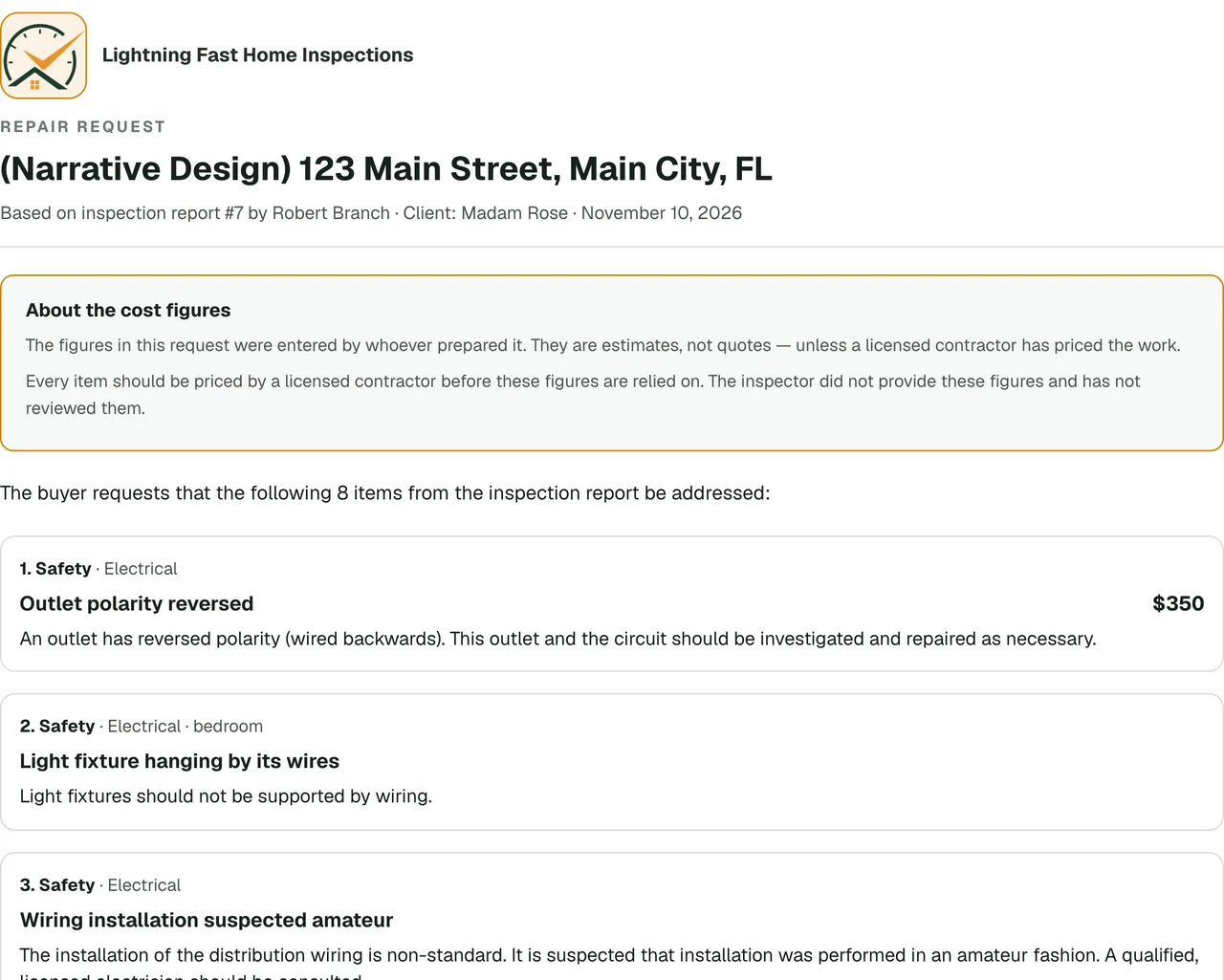
The request does not stay with the buyer’s agent. It goes to the listing agent, to the seller, and often to two or three contractors for quotes. Each of them is someone who may need an inspector, or know someone who does. A request that prints with your logo, your company information and the report it came from puts your name in front of all of them, on a document you can stand behind.
Where a repair request travels
Open from the report, with nothing to sign up for
An agent who has to create an account will go back to copying and pasting. So will a home buyer reading on a phone. The repair request should be one tap from the report itself, on any device, there from the moment the report is published, and mentioned in the email that tells them the report is ready.
Give agents a repair request in your own words, with JetInspect
In JetInspect, Repair request is in the published report’s own menu, and the email that says the report is ready tells the client and the agent they can build one. Every observation is already listed in your original wording, which cannot be edited, grouped by level with one tap to select all the safety items, all the repairs or all the maintenance items. The agent and the home buyer use the same page, on a phone or a computer, with no account.
For costs, they can type a figure beside any item or tap Auto-fill estimates for a price range on each ticked item. To make an estimate, only the ticked items and the city are used, never the address, the names or the photos. The printed request carries your logo and company information, and it states that the figures are estimates, not quotes, and that the inspector did not provide them.
Try JetInspect risk free for 30 days. Publish a report, open its repair request the way an agent would, and see what the people who refer you will see, before you pay anything.