
A solo inspector carries the whole business in their head: where they’re going, when they’re free, which report is half done. Add a second inspector and that stops working. Add a third and an office manager, and the business now runs on phone calls and texts unless the software can answer the questions for you.
That is the real difference between working solo and running a firm, and it is where home inspection software for multi-inspector firms earns its keep. The pressure comes from four directions: the season, the client’s deadline, the cost of the office, and what clients expect from a firm.
Why firms have different problems
Demand isn’t steady.Home inspections follow home sales, and home sales swing hard by season. Over the last twelve months of published figures, June saw about 386,000 existing single-family home sales, while January saw about 207,000. That’s nearly twice the work in early summer as in the middle of winter.
Existing single-family home sales by month
A solo inspector absorbs that swing by working longer days in June. A firm has to spread it across people, which means the schedule, not the inspector, becomes the bottleneck.
Clients are on a short clock.A 24-hour report is standard in the home inspection industry, and for good reason. The buyer’s inspection period is set in the purchase contract, and it’s short: in Florida’s standard purchase contract, from Florida Realtors and The Florida Bar, it’s 15 days from the effective date unless the parties write in another number, and agents often negotiate it shorter. The inspection usually happens partway into that window, so every hour lost between “inspection done” and “report delivered” comes out of the buyer’s negotiating time, and agents notice which firms are fast.
The office is a real cost.Most firms that grow past two or three inspectors hire someone to answer the phone and run the schedule. The median administrative assistant earns about $48,310 a year, or about $23 an hour. That person’s time is the firm’s most expensive overhead after the inspectors themselves, and software decides how much of it goes to useful work.
Clients expect more from a firm.They’re hiring a company, not one person, and they expect an inspector on the day they want, a report on time, and the same quality whoever comes out. The software has to deliver all three.
The questions every inspection raises
In a firm, each inspection passes through the same five questions on its way to the client. When the software can’t answer them on a screen, each one becomes a call or a text to an inspector who is in a crawlspace.
Five questions each inspection raises
- 1BookedWho takes it?
- 2AssignedAre they free that day?
- 3On siteAre they there yet?
- 4ReportHow far along is it?
- 5DeliveredDid it reach the client, and are we paid?
Here is what that costs if, say, four of those questions need a two-minute call or text. The numbers below are an assumption, so put in your own. The pattern holds either way: the office’s time grows with every inspection, while a software price per inspector only grows when you hire.
Office hours per month spent finding things out
Chasing payments adds to it. In the Federal Reserve’s 2025 report on small employer firms of every kind, 51% said uneven cash flow, which includes collecting on receivables, had been a challenge in the past year. Status calls and payment chasing are exactly the jobs good home inspection software for multi-inspector firms should take off the office’s desk.
What to look for: running the schedule
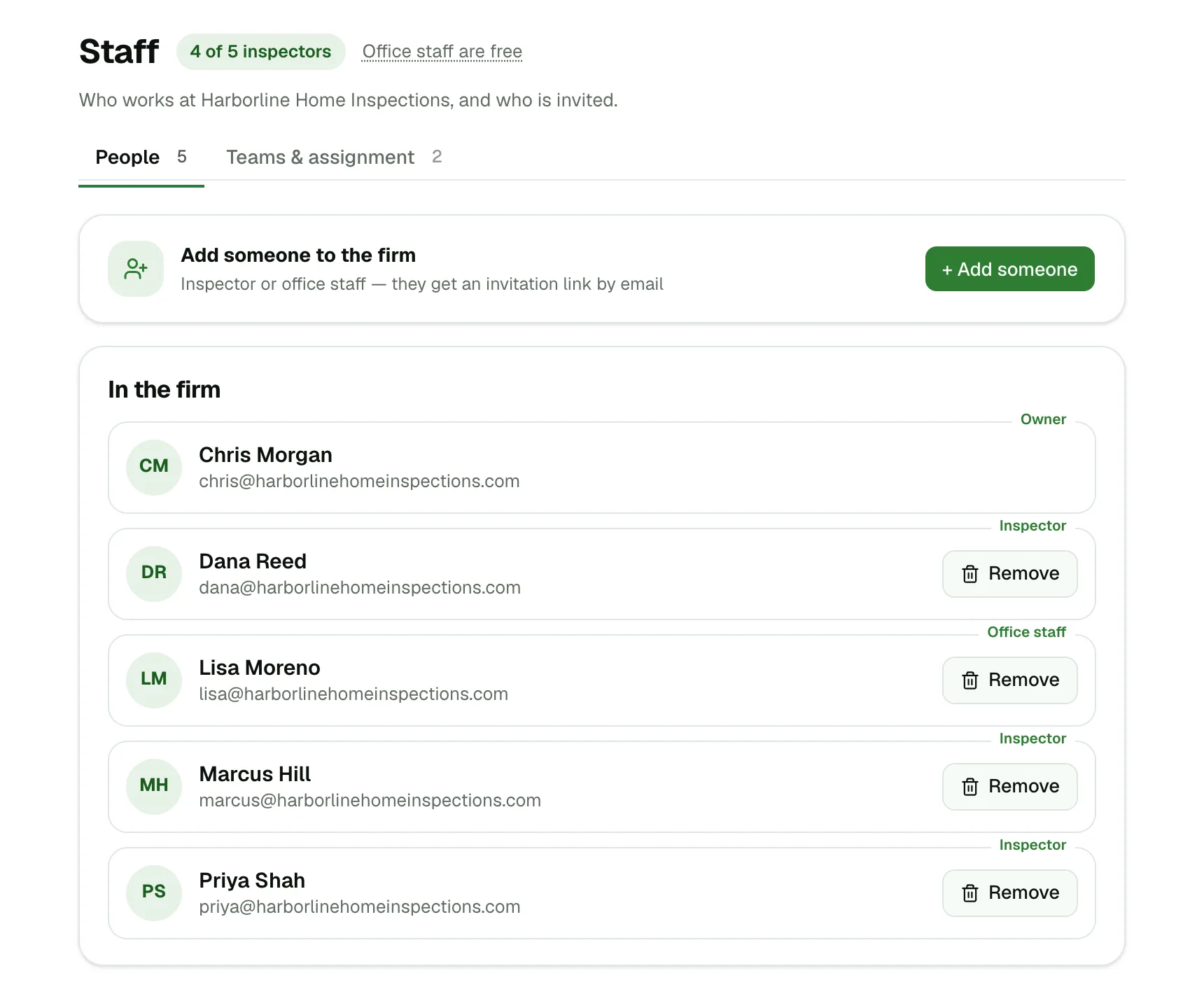
1. Office staff who don't cost a seat
The challenge. Your office manager books, assigns and publishes, but never writes a report. Some software charges a full inspector seat for every login, which makes your lowest-paid role one of your most expensive software users, and makes you think twice about giving a part-time scheduler access.
What to consider. Ask how office staff are counted before you compare prices. Look for scheduler and admin accounts at no charge, with enough access to run the calendar and send reports, but not to see what the owner keeps private.
2. Jobs assigned automatically and fairly
The challenge. A client books online at 10 p.m. Someone has to decide who takes it, and in the morning that someone is usually the owner. Done by hand, assignments drift: the fastest inspector gets buried, a newer one sits idle, and resentment builds.
What to consider. Look for software that assigns each new inspection to an inspector who is free, preferring whoever has the fewest jobs that day. Work stays balanced without anyone deciding, and a booking made at night is assigned before anyone wakes up.
3. Easy to override, with the schedule in view
The challenge. Automatic is right most of the time. Then a client asks for the inspector who did their last house, a commercial job needs your most experienced person, or a large home needs two.
What to consider. You should be able to add or swap inspectors on any appointment, and see who's already booked at that time before you do, so a fix doesn't create a double booking.
4. Firm-wide hours, adjusted per inspector
The challenge. Your firm books from 8 to 4, but one inspector starts at 7, another doesn't work Saturdays, and your newest only does mornings while they train. If the software only knows one set of hours, the office spends its day correcting the online calendar.
What to consider. Set appointment times once for the whole firm, then fine-tune each inspector's times, so online booking only offers slots someone can actually take.
5. Time off that warns you about conflicts
The challenge. An inspector books a long weekend in March and mentions it in passing. In June, nobody remembers, and a client is waiting at a house with no inspector.
What to consider. Inspectors should be able to add their own time off, and the office should be told right away if an inspection already falls on those days, so it can be moved while there's still time.
6. No inspection left unassigned
The challenge. A missed appointment costs more than the fee. It costs the agent who referred the client, and an agent can send a firm dozens of jobs a year. In the June rush, one unassigned booking is easy to miss.
What to consider. Look for a dashboard that highlights any inspection without an inspector, so the office sees it the moment it happens, not when the client calls.
7. One booking page for the whole firm
The challenge. Clients and agents want to book with the firm, not hunt for a particular inspector's calendar or wait for a call back. In a busy season, every call the office can't answer is a job that may go elsewhere.
What to consider. Look for a single booking page or website widget that offers only times when someone is free, assigns the inspection as it's booked, and sends confirmations and day-before reminders automatically.
What to look for: getting reports out
8. Two inspectors, one report
The challenge. On a large home, two inspectors split the work: one takes the roof and exterior, the other the interior and systems. If each writes a separate report, someone has to merge them that evening, and that's where items get lost and reports go out late.
What to consider. Look for collaborative reports, where several inspectors work in the same report at the same time from their own phones or the web.
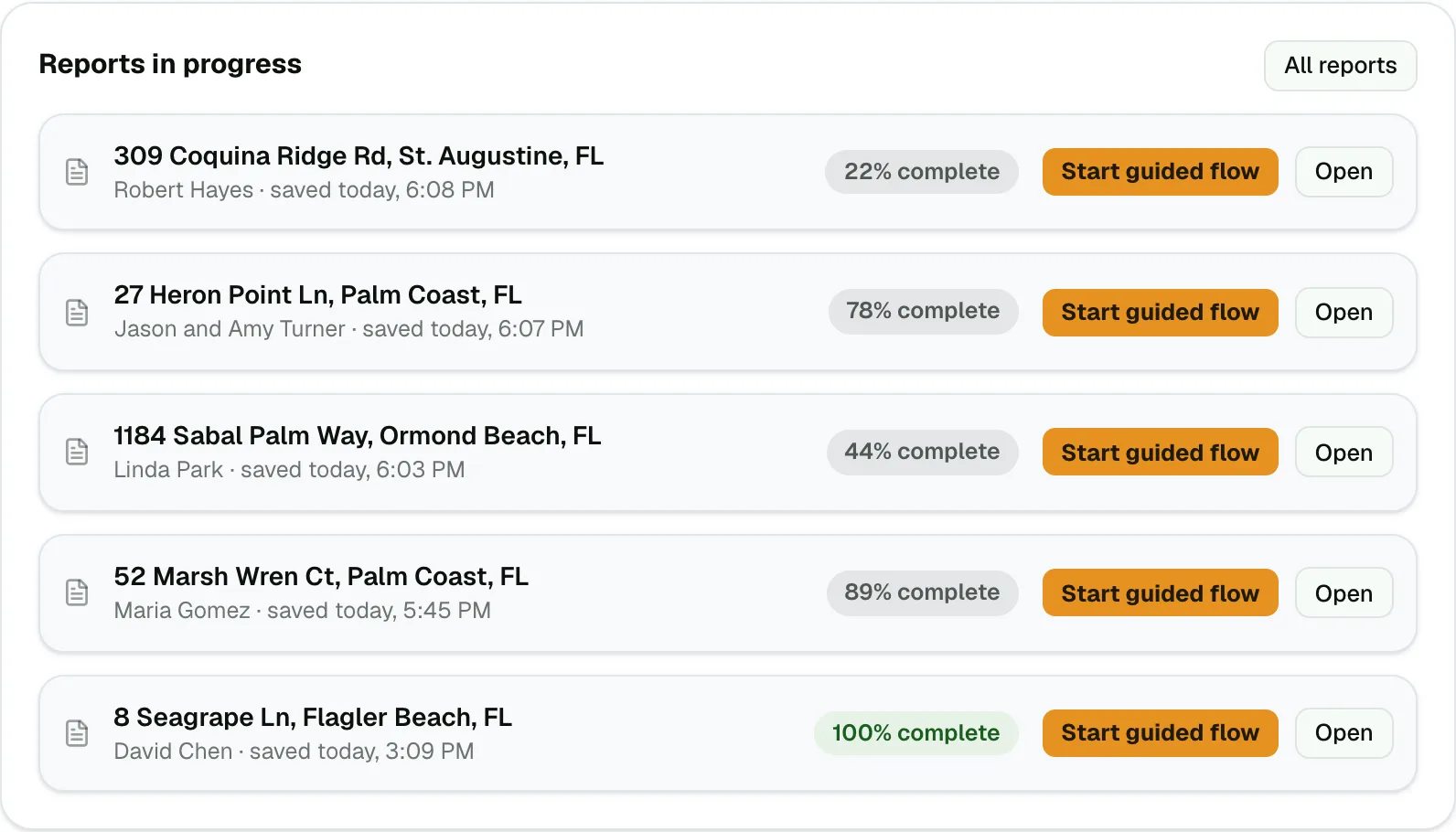
9. See how far along every report is
The challenge. “Is the report almost done?” is the question agents ask most. With a contingency window measured in days, the honest answer matters, and calling an inspector mid-inspection to find out helps no one.
What to consider. Look for a view of every report in progress with how complete it is, updated while the inspector works on site, so the office can tell the agent “within the hour” or “tonight” without interrupting anyone.
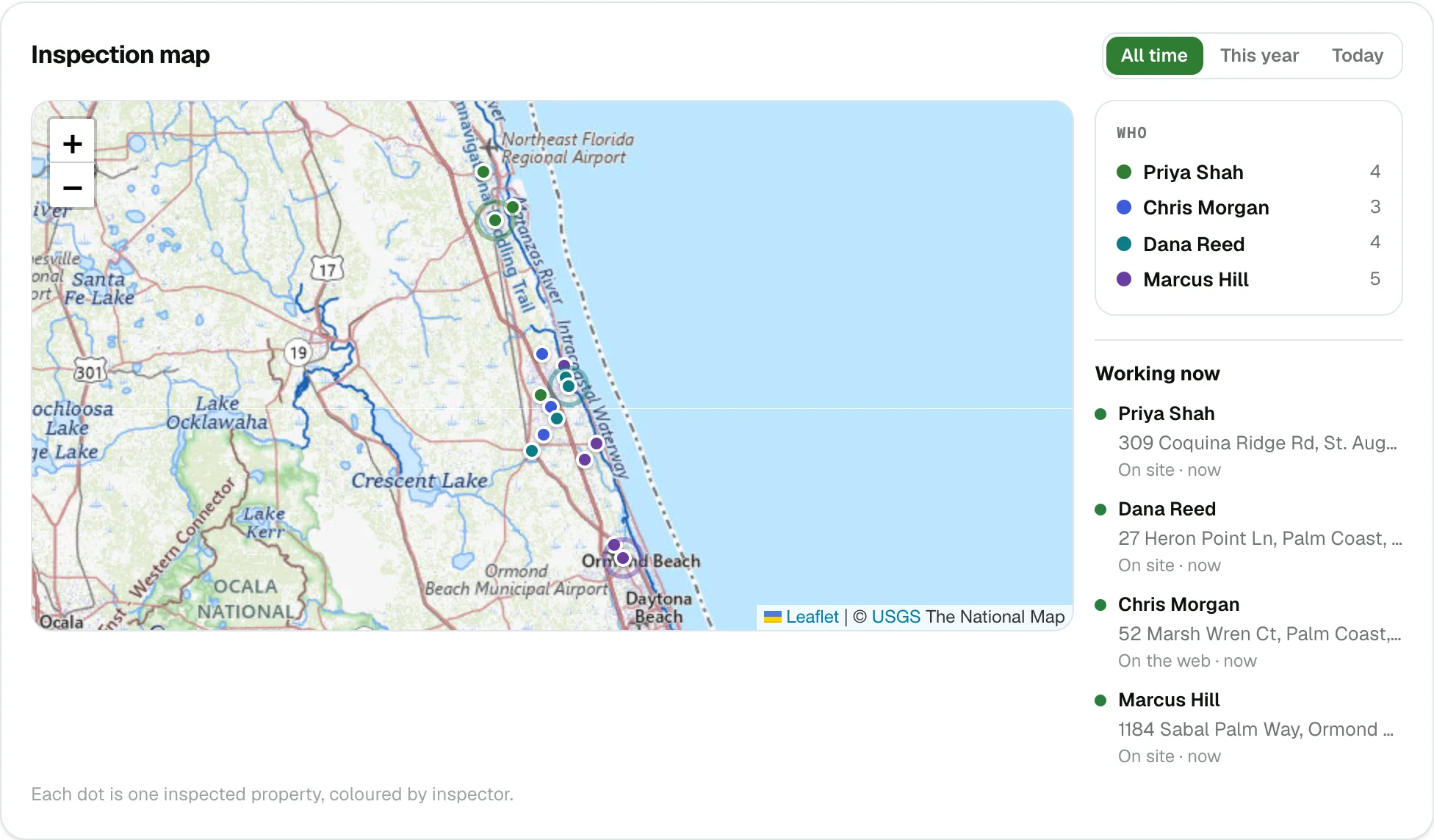
10. Know who is on site now
The challenge. A seller calls to ask if the inspector has arrived. The office doesn't know, so it texts the inspector, who is on a ladder.
What to consider. A map of the day’s inspections that shows who is working on which report, and whether they’re on site, answers “are they there yet?” at a glance. Beside it, a referrals view shows which agents and offices send you work.
11. Reports that read like one firm
The challenge. Clients and agents judge the firm, not the inspector. When each inspector writes in their own words, uses their own comment list and their own layout, the firm's reports look like five different companies.
What to consider. Look for one shared comment library everyone builds on, templates made from your best reports, and your company's logo and branding on every report. A large starting library and fast search by voice, text or video also help a new hire produce firm-quality reports from their first week.
What to look for: money and growth
12. Agreements signed and payments collected before the report goes out
The challenge. With several inspectors in the field, the office can't personally check that every client signed the agreement and paid. A missing signature is a liability risk, and every unpaid invoice is another call for the office to make.
What to consider. Look for agreements tied to each appointment, the option to hold reports until they're signed, card payment online, and reports that release automatically when payment clears. That way the rule is enforced on every job, not just when someone remembers.
13. Earnings only the owner can see
The challenge. Your office manager needs the schedule. They don't necessarily need to see what the business earns each month.
What to consider. Look for scheduled revenue that only the owner can see, even when office staff run the rest of the system.
14. Easy to add inspectors, with pricing that scales cleanly
The challenge. Firms grow in steps: a new hire before spring, a departure in the fall. Software that takes a support call to add someone, or moves you to a pricier tier with different features at a certain size, makes every hiring decision harder.
What to consider. Adding or removing an inspector should take a couple of clicks. Look for a simple price per inspector, the same features at every size, and the ability to change plan size or cancel at any time. Being able to group people who work together into teams also helps the schedule match how your firm runs.
Every inspector still needs the full toolkit
Firm features only matter if each inspector’s day goes well. Every inspector in a firm should get the same field tools as a solo inspector: building the report on the phone while inspecting, working with no signal, reading equipment data plates and checking for recalls, specialty forms like 4-point and wind mitigation, and today’s schedule on their phone with tap to navigate and tap to call. Confirm that none of these are held back for a higher plan.
How JetInspect measures up
Here is the list above, answered for JetInspect.
Office staff. Office staff, as many as you need. Schedulers and admins never cost extra.
Assignment.Every job goes to whoever is free with the fewest that day. You can add or swap inspectors on any appointment and see who’s already scheduled at that time.
Hours and time off.Appointment times are set firm-wide and per inspector. Inspectors add their own time off, and you’re notified if inspections need rescheduling.
Nothing missed. Unassigned jobs are highlighted on your dashboard.
Booking. A booking widget for your website, with automatic confirmations and day-before reminders.
Reports. Several inspectors can work on the same report at the same time, on their phones or the web. You can see how far along reports in progress are while inspectors fill them in on site.
Map.Every inspection plotted, who’s working on which report right now and whether they’re on site, and who sends you the work.
One firm.A complete home inspection library searchable by voice, text and video, templates from any finished report, and company branding on every inspector’s report.
Money. Agreements linked to each appointment, reports blocked until signed, card payments that unlock the report when payment clears, and scheduled revenue visible to the owner only.
Growth. Add and remove inspectors in a couple of clicks and create teams. $20 per seat per month, counting the owner and each inspector, in plan sizes of 1, 2, 3, 5, 7, 10, 15, 20 and 25. A firm of four takes the five-seat plan at $100 a month. Same features at every size, no per-report fees, no setup charge.
Field tools.Every inspector gets the full app: offline use, data plate reader and CPSC recall search, 4-point and wind mitigation forms, and today’s schedule with tap to navigate and call.
Try it free for 30 days. Set up your firm, add your inspectors and office staff, and run your next few inspections through it before you pay anything.
Sources: home sales from the National Association of Realtors via FRED (series EXSFHSUSM495N); administrative pay from the U.S. Bureau of Labor Statistics, May 2025; small business cash flow from the Federal Reserve’s Small Business Credit Survey, 2025 Report on Employer Firms; the Florida inspection period from the Florida Realtors/Florida Bar Residential Contract for Sale and Purchase (Rev. 12/24). The office-time figures are an illustration based on stated assumptions. The screenshots show a sample firm; every name and address in them is made up.