
Your subscription and free trial
Start the free trial, see your plan, add inspectors, and cancel through Google Play or the App Store.
Start your free trial
The first time you open JetInspect, it offers a free trial. Google Play decides who qualifies. If you have used a trial before, the button reads Subscribe instead and you are charged when you confirm.
- 1Sign in with Google and follow the setup.
- 2On the offer screen, tap Start free trial (it shows the trial length, such as Start 30-day free trial).
- 3Choose your plan, tap Subscribe to your plan, then confirm in the Google Play sheet.
See your plan
- 1Open Settings > Plan.
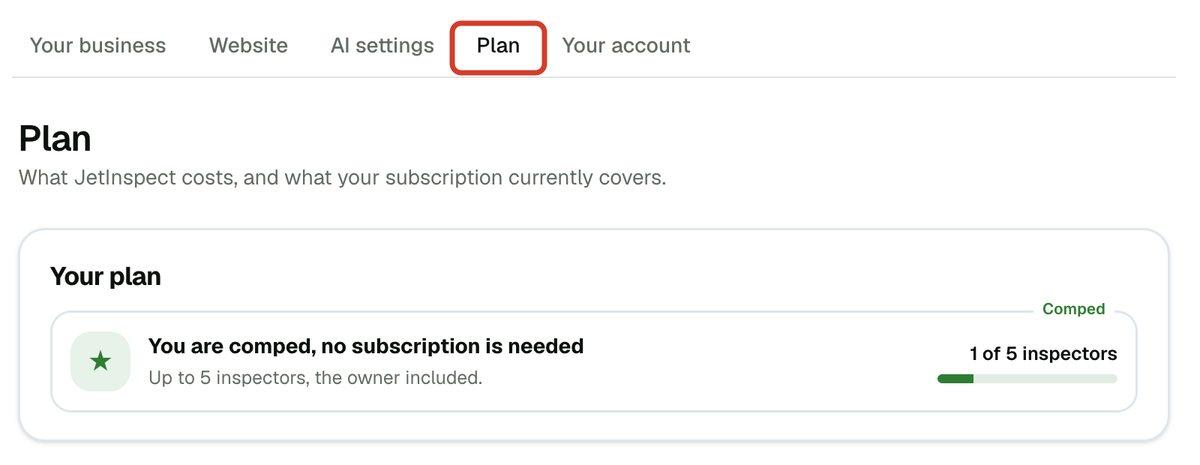
- 2Read Your plan. The tag shows Active, Expired, Comped or No plan yet, with the price and, on a multi-inspector plan, how many inspectors are in use.
Some accounts are comped and need no subscription. Their plan reads You are comped, no subscription is needed.
Change your plan or add inspectors
A plan is a base plan for one inspector, plus any additional inspectors for your firm. See Running a multi-inspector company for how a firm uses them.
- 1Open Settings > Plan.
- 2Under Change your plan, set Additional inspectors with the stepper. 0 is the base plan on its own.
- 3Click Change subscription (Subscribe if you have no live subscription).
- 4Open JetInspect on your phone to finish. Nothing is charged until you confirm there.
Manage or cancel your subscription
Payment method, receipts and cancelling are handled by Google Play, on the phone.
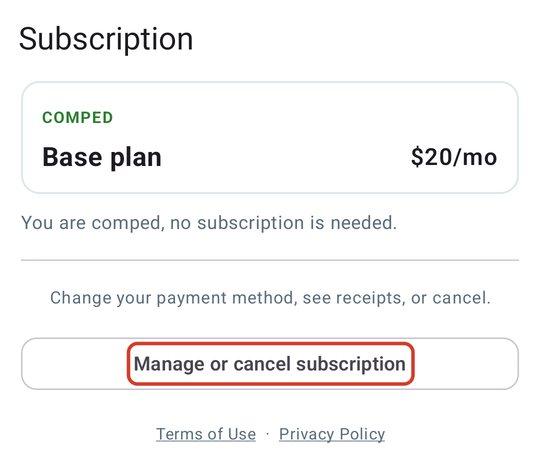
- 1On the phone, tap Settings > Subscription.
- 2Tap Manage or cancel subscription. Your store's subscription page opens.
- 3Change your payment method, see receipts, or cancel there.
If the store page will not open, the app shows a web address where you can manage it in any browser. The web editor has no cancel button.
If your subscription ends
Your reports are kept in your own Google Drive and stay yours. What changes is what you can do in JetInspect.
- 1On the phone, reports you work on are saved on the device only. The home screen says reports saved on this device only and the backup button reads Subscribe.
- 2Backing up to Drive, publishing and making a PDF wait until you subscribe again.
- 3On the web, the editor shows Your subscription has ended. Resubscribe on your phone, then click I've subscribed — check again.
To come back, open Settings > Subscription on the phone and choose a plan. Use the same Google account you subscribed with.
If you work for an inspection company
Your company owner holds the subscription. In Settings, your Subscription row on the phone reads Covered by your company, with nothing to buy. On the web, Plan says your company's owner manages the plan. If it lapses, ask the owner.