
Working with no signal
What keeps working in a basement or a dead zone, what waits for a connection, and how to see what is still waiting.
What works with no signal
Everything you do while inspecting is saved on the phone as you go. With no connection you can keep working on reports already on the phone: add observations and photos, fill in sections and answer forms. Typing in Finding the right comment still finds your comments, because the library is stored on the phone.
AI search, if you have it on under Settings, runs on the phone too. The app says so itself: it works with no signal.
What waits for a signal
These need a connection, and pick up by themselves when you have one:
- Backing up reports, photos and clips to your Google Drive. See Your reports in Google Drive.
- Publishing a report, and sending it to your client.
- Making the PDF of a form. Answering the form works offline.
- Updating your comment library. It updates itself a few times a day, and Refresh comment library under Settings does it now.
- Showing the same work on the web and on your other devices. See Using the phone and the web together.
Nothing is lost while you wait. Your reports and photos stay on the phone, and upload automatically whenever you are online.
See what is still waiting
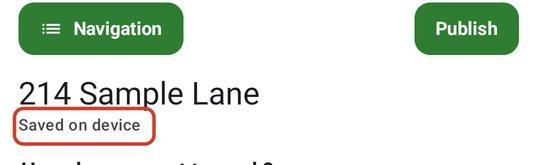
- 1Inside a report, read the status line. Saved on device means the work is on the phone only. It reads Saved on device · backs up to Drive when you leave while changes are waiting, and Saved on device · ✓ backed up to Drive once everything has gone up.
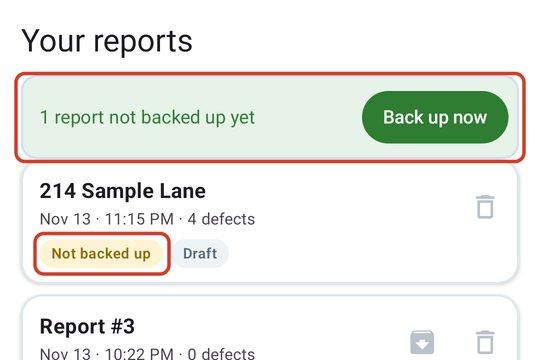
- 2Tap Reports. Each report shows Not backed up or ✓ Backed up. A banner at the top counts them, for example 2 reports not backed up yet.
- 3Back on a signal, tap Back up now on the banner. It reads Backing up… while it works.
- 4To see photos and clips still to upload, tap Settings > Google Drive. The card says how many are still to upload, and shows Back up now if you need it.
Open the app with no signal
If you have signed in before, you stay signed in and the app opens straight to your reports. If JetInspect asks you to sign in again and you have no signal, tap Continue offline under Sign in with Google. You can keep working on reports already on the phone. Publishing, backup and scheduling wait until you sign in.
Continue offline appears only for someone who has signed in on this phone before. A brand new install has to sign in once with a signal.
When you are back on a signal
Open the app. Backup and syncing run on their own, and the pills turn to ✓ Backed up. Then publish and send as usual. See Publishing, previewing and sending.